Blog about (Web-) Programming, Graphics and Games.

Posts mit dem Label Games werden angezeigt. Alle Posts anzeigen

20.01.2015

Hearthstone inspired card game test

Its a card game for 2 players, human versus the computer. Cards have 3 properties: cost, attackpoints (ap) and hitpoints (hp). A card with 4 cost can have 4 ap and 4 hp. It might have more/less ap, but then less/more hp too. General formula is cost/2=ap+hp. Cards can attack opponents cards or the opponent directly. If a card gets attacked or attacks its hp decrease by the ap of the other card. If a player is attacked directly, its hp decreases, if its value is 0, the game ends. The game is written for html canvas 2d, optionally webgl. It is based on the same rendering code as a previous game demo. A focus of this game test is playability on mobile devices, as card games are perfect for them (and there is now Hearthstone for android and ios too).

►Start game

31.01.2014

cutout.js - Game Test

The animation project of a previous blogpost is now extended to a game experiment, with following features:
  • Canvas or WebGl renderer via menu
  • Stereo WebAudio synth effects
  • Particle system
  • Various controls depending on system and browser: keys (wasd,cursor,ctrl), mouse, touch or gamepad
Game mission is to fight the mobs. Health regenerates over time. One should only fight single ncps at once. Current quest is to finish the game in less than 264.9 seconds. :)

►Start game
►Github repository

04.10.2013

Wloom 14: WebGl Run

This WebGl game demo is inspired by Temple Run and similar games. The protagonist runs along beziercurves, must collect gems and avoid foes. The demo ought to run smooth on mobile devices using simple WebGl rendering and on desktop with more graphics effects via three.js or glge. A various number of input controls is supported (if device and browser has it): keyboard, mouse, touch, tilt and gamepad.

►Start

Update 9.10.2013: Got an oculus rift device and added a Three.js render mode for it. If you have the device and a browser plugin installed, virtual reality is there.

24.06.2013

Wloom 13: Three.js

Wloom game environment can now use Three.js for rendering. Overall there are now 4 different renderers: Three.js, Glge, Simple and Magic3d. They differ in graphics effects and library size, thus should make Wloom run on fast and slow devices.

To demonstrate the new renderer, there is a new walkable level and some randomly moving mobs. The level architecture and texture was done using the Web 3d Editor of previous blogpost. For next version, Wloom 14, more advanced level structure and full gameplay is planned.

►Start demo

Update 3.7.2013: Added vertical architecture, vegetation billboards and mobs walking along paths.

03.05.2013

Wloom 12: New Mobs

This WebGl game demo contains a new map and new mobs. A focus is improved usage of gamepad or touch controls by applying autofocus during fights. Moving left/right then moves around the focussed mob.

►Youtube
►Start demo

19.03.2013

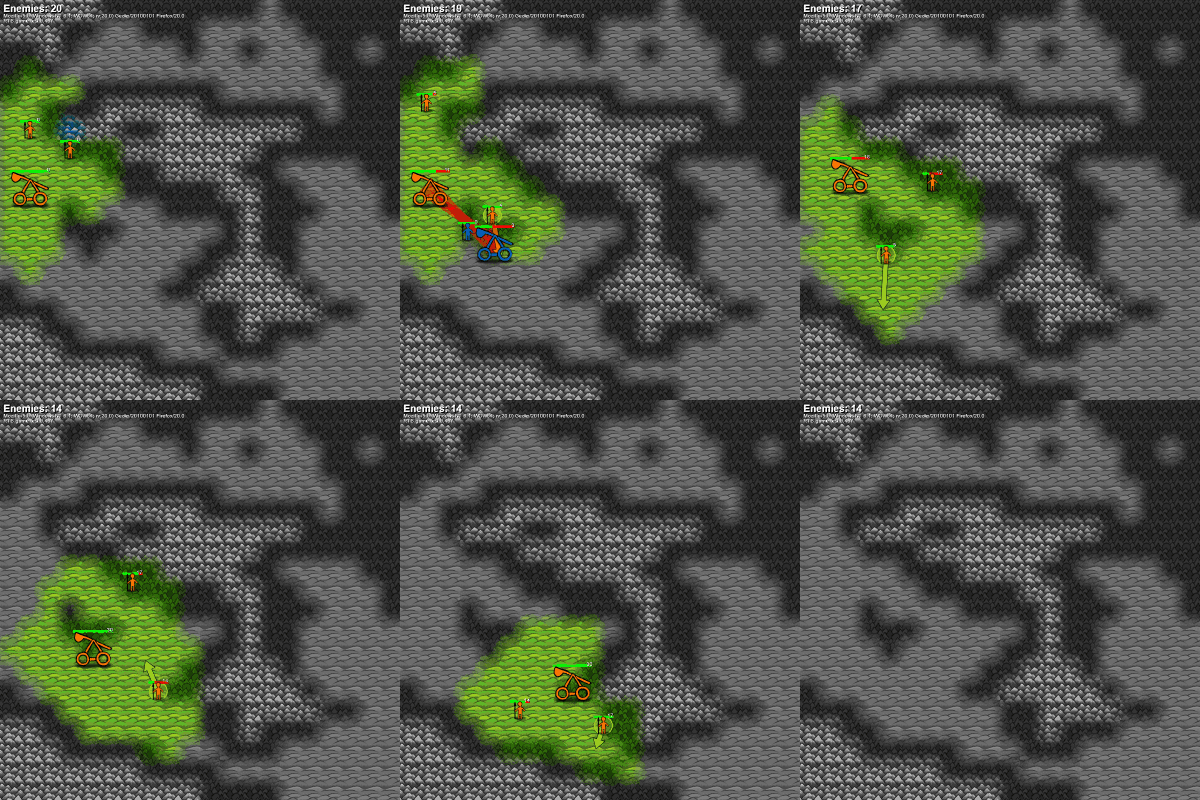
Strategy game experiment

This is a strategy game experiment. A goal is multiplatform, so that it can be played on phones and (even more appropriate) on tablets. Again the textures are made with the web paint app WePaint.

►Start

Update 4.4.2013: Gameplay is added, it consists of following points:
  • Its is basically real time strategy (RTS), all units can move at the same time.
  • A goal was very simple gameplay (with mobile devices in mind). To move is the only command for units. They attack automatically, if there is something in range. To stop an attacking unit, it as to be moved out of range.
  • The map consist of 3 different landscape tiles: lowland,forest,mountains. They affect view range, unit velocity and attack/defense. Lowland has best view range, highest unit velocity and worst attack/defense. Mountains has opposite values and forest is inbetween.
  • There are 2 kind of units, melee and ranged (catapult). Melee attack at near range, ranged units attack at far range but not at near range.
  • Units have hitpoints that regenerate over time. If a units lost all hitpoints, it is removed.
  • Each unit also has experience points, which increase during attacks. The more experience a units has, the better it attacks and defends.
  • Game mission is to defeat all the enemies.

Update 12.4.2013: Games can be recorded and replayed as gif. Resulting gif images are quite small, because 6bit palette and incremental draw is applied (using the library omggif.js).

09.02.2013

Wloom 11: Slenderman tribute

This WebGl game experiment is a tribute to the slenderman games. Implementation focus was, to have similar game experience on different platforms, desktop and mobile, using different controls, keyboard/mouse or gamepad or touch. The textures were created with the web paint app WePaint.

►Youtube
►Start game
(WebGL enabled browser)

16.12.2012

Wloom 0.10: Desktop and Nexus 7

This time focus was, to have the same WebGL game demo being fluently playable on both Desktop and Nexus 7. To achieve this, on Nexus 7 the resolution is lowered. Also different renderers for different platforms are used. On Nexus 7 its a simple one, on Desktop its a more advanced renderer using GLGE for better effects (shadows, particles, lights). Finally, to have the demo being playable on Nexus 7, touch controls are added. They are visible on Desktop too and then display, which keys are pressed.

►Youtube
►Start demo
(WebGL enabled browser, on Nexus 7: Firefox Beta, Opera mobile, Chrome beta with flag set)

This is probably the last blogpost before the end of the world on 21.12.2012 of this year, thus happy holidays and a good new year everybody! :)

Update 8.1.2013: Added improved menu and gamepad support. Gamepad works here with Chrome on Desktop. So now the demo runs on desktop and mobile with either keyboard and mouse, touch or gamepad controls. Its a nice level of 'write once, run everywhere'.

Update 26.1.2013: Chrome beta for android with easy WebGl access is now released. There, lowered resolution is no longer necessary since fps stays high on high resolution. Graphics shows performance of different browsers on Nexus 7 at different resolutions. Added a fullscreen menu item. On Nexus7 it works only with Chrome beta.

22.08.2012

Wloom 0.8: Demon forest

Finally a new version of WebGL game project Wloom. This time focus and new features are as follows:
  • Spooky environment and gameplay: Fight demons and survive.
  • Better sound via freesound.org.
  • A shotgun.
  • Update: Uses html5 fullscreen and pointerlock abilities.
►Youtube
►Start demo
(WebGL enabled browser, no IE)

30.11.2011

Wloom - WebGl game, work in progress #7

WebGl game Wloom version 0.7 is here with following changes:
  • Jump&run-gameplay is introduced.
  • Core game abstraction. To ensure that the gameplay is working well and for better testing, the core game is a standalone module, which can be applied to different renderers. Wloom7 is essentially a webgl renderer for the core game. There is a second, very simple renderer, which displays the game as blocks on a canvas.
  • The design of the npcs is inspired by Starcraft2-banelings.
  • There are new sounds, made with sfxr.

►Youtube
►Start demo
(Chrome 9+, Firefox 4+)
►Start simple core game canvas demo

13.08.2011

Wloom - WebGl game, work in progress #6

WebGl game Wloom version 0.6 is here.

►Youtube
►Start demo
(Chrome 9+, Firefox 4+)

Changes:
  • New content: map and templar model
  • Basic scripted cutscenes. They are defined in a external map-script-file (same as AI,...), thus dont strain game core.
  • Minor changes, e.g. in previous version the whole map mesh was used for collision calculation. Now there is coarse collision mesh and a more fine-grained visible mesh.

12.06.2011

Wloom - WebGl game, work in progress #5

WebGl game Wloom version 0.5 is here.

►Youtube
►Start demo
(Chrome 9+, Firefox 4+)

Changes:
  • Latest version of GLGE library and a new feature of it, shadows on direction lights, is used. The issue of previous Wloom version, where shadows didnt work with Firefox 4, is resolved.
  • The Wloom demo this time is basically a complete game, where you can win or loose, with UI. The game logic is pacman-like: You have to collect gems, but must avoid monsters. This time isoperspective is used. Game logic and ai is loaded dynamically from an own script file. As result Wloom represents a flexible base for various kind of games. The UI is done via CSS and also completely from external scripts.
  • A new rendering mode 'Magic3d' is added. With it the scene is drawn twice, side by side, with camera offset. Now, if you cross the eyes, scenes should appear in 3d. All in all there are now 3 rendering modes: Glge, Simple and Magic3d.

28.05.2011

Canvas experiment: Build order simulator

The demo simulates build orders as of RTS games (e.g. Starcraft2). Here buildorders are very simplified, there is only 1 structure, the central; 2 unit types, worker and knight; and 1 resource, gold. To build those, gold must be paid. Workers harvest gold. Centrals produce units, the more centrals and gold exists, the faster units can be produced. The history of the build is displayed as graph. If the simulation is restarted, history graphs of previous runs are kept and displayed too, this allows to optimize a builder order.

12.04.2011

Wloom - WebGl game, work in progress #4

WebGl game Wloom version 0.4 is here.

►Youtube
►Start demo
(Chrome 9+, Firefox 4+ shadows currently dont work with ff here, this is under investigation..)

New features:
  • GLGE library use. With this lib better gfx is possible. The use of the library is optional and can be toggled with a checkbox. So there are now 2 selectable gfx passes, the feature-rich GLGE one and the simple original. Thus the game should run on fast and slow computers. Maintaining different gfx passes helps to isolate gfx logic from game logic and thus should result in better programmcode. With GLGE there are following new gfx features:
  • Lights & shadows,
  • Normal-, specular- and diffusemaps,
  • Particle effects.

13.03.2011

Wloom - WebGl game, work in progress #3

Finally there is a new version of the WebGl game Wloom.

►Youtube
►Start demo
(Firefox 4+, Chrome 9+)

Following new features:
  • Skybox (the one I wrote about in a previous blogpost)
  • New map with hills and a tunnel
  • Map reiterates infinitely, thus the world does not end :)
  • Basic ai (npcs move away, if they are near another character)
  • Attack (key E), experimental fly mode (key N)

11.03.2011

Starcraft 2 casts

In the last weeks I did spend some time watching Starcraft2 casts. I find them very entertaining to watch and they teach you to play. On the other hand watching alot casts is very time consuming. With this blogpost I will give an overview of my favorite casts. Following table contains name, url, unique features and, if existing, the main fraction and league-level the caster is playing. Because I watched casts only for the last weeks, the data assembled below might be incomplete or partly wrong. In this case please notify me and I will update things.

NotesFraction/League
PsyPartly very funny.Zerg/Master
HDBasically awesome.Zerg/Master
TotalHalibutBritish accent. Partly very funny. Also other games like WoW.Terran/Silver
HuskyReference. Different game-styles (e.g. 4v4).Protoss/~Diamond
Day9Reference. Focus on in-depth (but also time consuming) analysis.
AhnarisBasically awesome.Terran/Gold
DestinyVery funny.Zerg/Master
Gom TvGreat GSL pro games. Login (e.g. via Twitter), partly free to watch.

Btw, the work on a new version of the WebGl game Wloom is almost finished. Thus there will be a new demo in a couple of days on this blog.

27.01.2011

Wloom - WebGl game, work in progress #2

There is some progress with the webgl game 'Wloom'. Current state of the project can be seen in the video or as running demo here (needs Chrome 9+, Firefox 4+). Following features have been added since the last blogpost:
  • Dynamic camera (e.g. in small rooms camera moves closer, so that the view is not clipped)
  • Map and model data are loaded from external files. Its format is javascript, they are loaded with dynamically added script tags.
  • Html audio. Currently it sounds on my pc with chrome 9 abit buggy (it seems some samples are not played and chrome crashes after some time). With Firefox 4 beta 6 sound works better here.
  • Npc scripting with javascript. Since core game and npc scripts are written in the same language, javascript, integration is straightforward and simple. The code can be stored in map- or model-files.
Soon there will be updates on the project. Map(s) and gameplay shall be improved. :)

21.12.2010

Wloom - WebGl game, work in progress

Currently I work on a game for WebGL named 'Wloom'. It shall be fastpaced, from egoperspective, with walkable architecture, maybe an egoshooter. Initially i wanted to call it 'Gloom', but that is taken by an amiga game. So in 'Wloom' the 'Wl' is short for WebGL, 'oom' is a reminiscence to another great game. :) On the right is a video of the current state. You can test the game (with a webgl-capable browser) here. Currently you can only run around with a protagonist and watch the map. Main controls are w,a,s,d,left,right, you can also look around with mouse drag. The WebGL-canvas automatically resizes with the browser, thus the game may run fullscreen.

With this I wish the visitors of this blog Merry Christmas and a Happy New Year. Updates on this and other projects will be posted soon, but probably not before 2011.

26.11.2010

CanvasCraft - towards a web RTS game (²)

A previous blogpost is also transcribed with 'towards a web RTS game'. There I focussed on webgl graphics. This time the focus is the game core engine, thus here graphics are very simple, units are drawn as circles using canvas. Conceptually, once the game core engine is finished, one could combine both approaches and get a game demo with improved gameplay and graphics.

In this demo units can be selected via mouseclick, by mouse-dragging a rectangle around some, or via numeric keys (e.g. shift-1 constitutes a group of previous selected units, key 1 then selects this group). Selected units can be moved by rightclicking on the ground or on another unit. By pressing key P the game pauses.

There are units of 2 different parties (blue-you/orange-computer). If units of different parties approach they will fight each other. There are 2 unit-types: slow ranged and fast melee. The game is over, if all units of a party are gone. The filesize of the javascript code is ~12kB.

14.11.2010

A lazy defensive terran strategy for Starcraft2

In this blogpost I describe, how I play Terran in Starcraft2 Multiplayer. The strategy is defensive, this way I try to avoid micromanagement, which I'm too slow for. When I last looked, my average APM (action per minute) was about 20. Battlecruisers play a big role, but also infantry. At first I summarize the strategy, then I describe some detail aspects.

Summary:
  • Beginning build order: Scv, Scv, Supply depot, Scv, Barracks, Scv, Barracks, then Marines
  • Built up infantry (about 10 marines, 8 marauders) as defense. Make the infantry short-key 2. Besides constantly make Scv, Supply depots as needed, 2 Turrets around the Command center. Dont build too much Turrets, since fleet should do anti-air tasks soon.
  • Build Planetary fortress, a Starport, start building a fleet (a raven and some vikings) and make it shortcut 1.
  • Build a 2nd Command center, together with each base build 2 Turrets, 2 Refineries, and later Planetary fortress. Build up fleet (vikings, maybe few banshees, battlecruisers), level up fleet to the max (with 2 armories) Build about 5 Starports.
  • Build maybe 2 more expansions or more. Probably meet enemy, attack with fleet and infantry (key 1 and 2). If you have battlecruisers, attack as much with yamato cannon as possible, (this is almost the only micromanagement needed). If fleet is crushed, rebuild quick.
  • Hopefully defeat enemy.

Detail aspects:
  • Often the enemy attacks early, then try to have a good infantry built up, keep infantry and fleet near the Turrets and Planetary fortress, so that they defend together, and very important: make some Scv's repair Planetary fortress during attack.
  • Thors: In the beginning I tried to attack with Thors. But they couldnt move everywhere like air units can, so I dont use them.
  • Make sure you have detectors. 2 Turrets for each base and Raven in the fleet.
  • Bunkers: In my first games my intial defense was too weak. First I tried to put the Marines into Bunkers, now I just build Marines more quickly with 2 Barracks and dont use bunkers.
  • Once I attacked enemy with medium fleet, made some damage but lost fleet, couldnt rebuild quick, lost game. Thus, attack only with maximum unit count and max upgraded. Make sure there are enough Starports and resources for quick fleet rebuild.
  • Sensor towers: I am not sure, if they are good. For the first base I usually build one. You see sooner, when the enemy attacks, and have more time to position fleet and infantry for the battle. On the other side from the towers the enemy knows your positions and might attack earlier.
  • Only build banshees in the beginning or when you have few resources, otherwise build Battlecruisers for ground and air defense.