Blog about (Web-) Programming, Graphics and Games.

Posts mit dem Label Javascript werden angezeigt. Alle Posts anzeigen

26.01.2017

Text search with a folding editor

Implemented text search for the web folding editor. Similar to the advantage of folding editors in general, that an overview of a whole document can be given while details are blended out (folded), with text search an overview of lots or all text-occurences is visible at once. In Detail finding text works as follows:
  1. Highlight all visible occurences.
  2. Highlight closed folders with a number of hidden occurences inside.
  3. Successively point the cursor to different occurences, possibly open folders for hidden occurences and closing them again if next occurence is elsewhere.

12.12.2016

Happy Feast of Winterveil!

Last blogpost of this year, everyone a good transition to 2017! Assembled 2 2D javascript experiments. First has a walking and tumbling Santa Claus with randomly generated snow flakes. Second renders vegetation, moving as a frog runs through it.

► Start Santa Claus
► Start Vegetation


28.02.2016

Recent projects, Start 2016


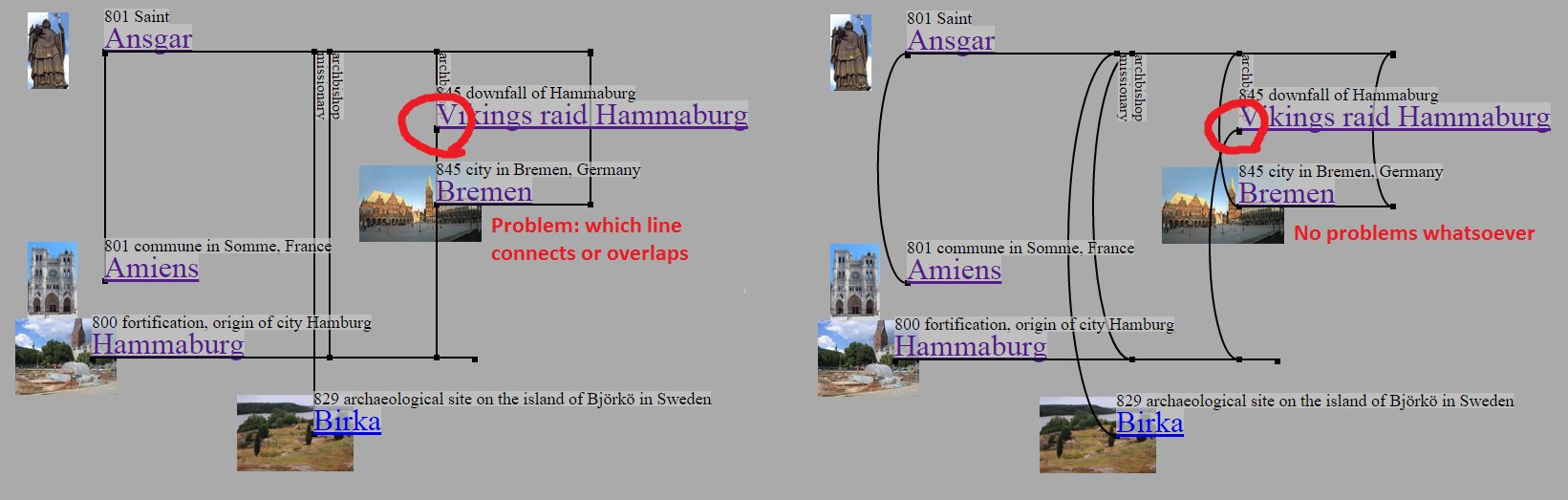
History wikidata visualisation: ellipse > line. [Start]
Also first time tinkering with SVG.

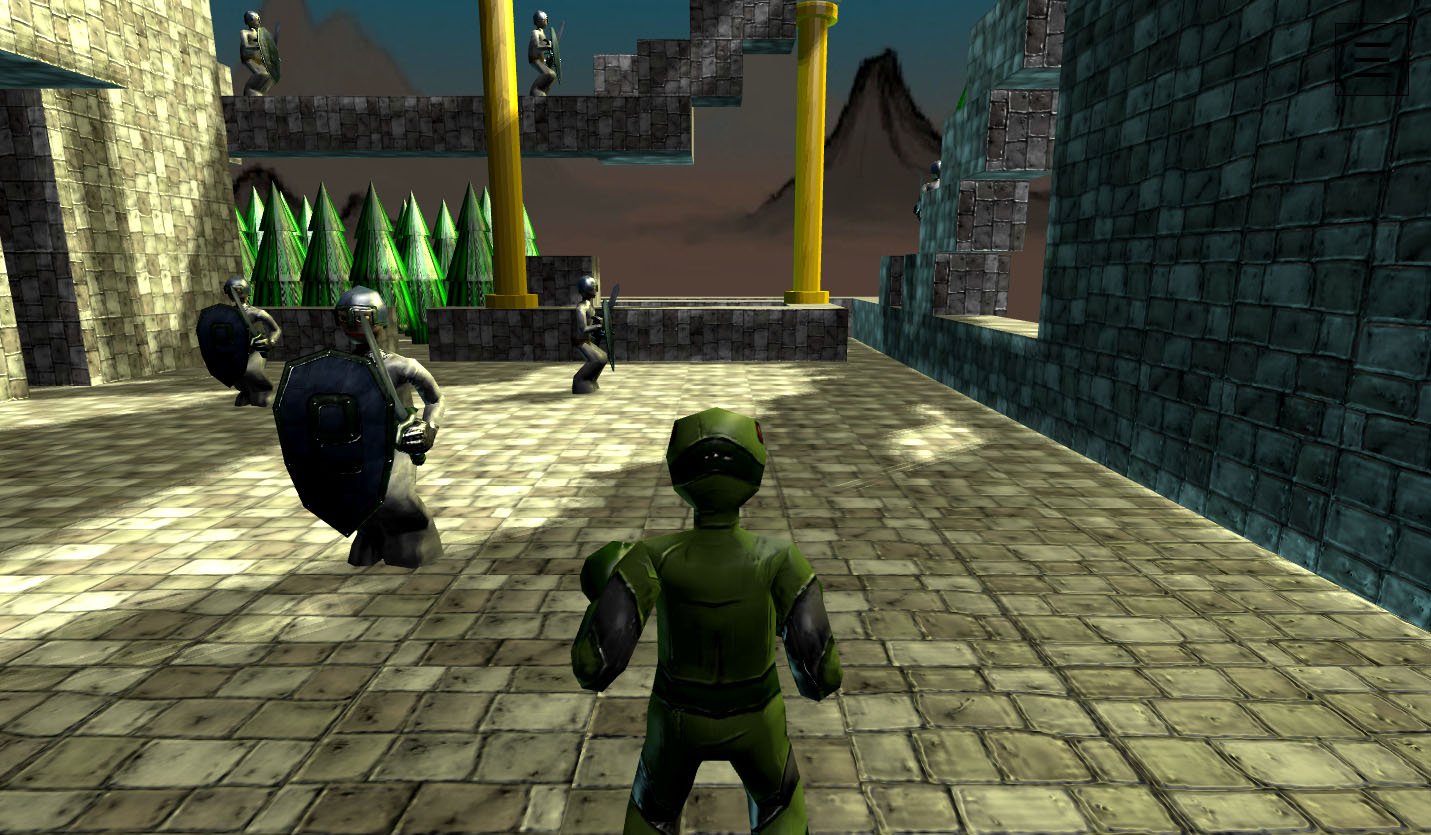
New Threejs demo is online. Now with textures,
details, skybox aaand.. hamburger menu. [Start]

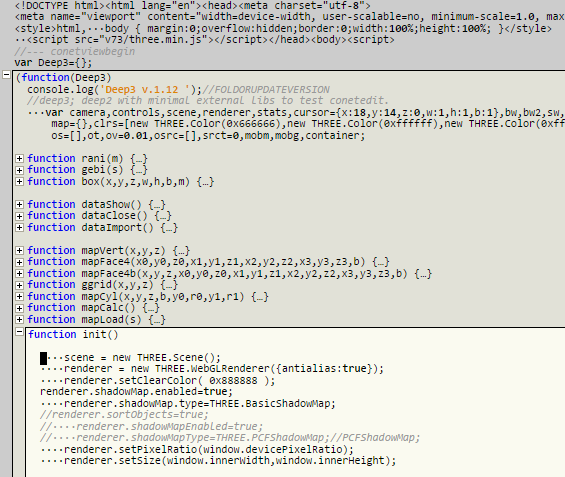
Web folding editor with syntax highlighting
for mobile and desktop. [Start]

08.09.2015

Back to VR, now mobile.

About 2 years ago I got the Oculus VR device DK1. It was great pixelated fun. VR apps could be written in the browser with the help of plugins or socket-connection to an external vr application. Today browsers start to make it easier by implementing WebVR (and deprecate plugins, but thats another story).
     
Now that I needed a new mobile phone to replace the trusty samsung s3 mini, it was a quick decision to get a s6 together with a gear vr device (by samsung & oculus). Its great fun again, less pixelated. Oculus home app starts as soon as s6 and gear vr are connected and has great apps and vr media, my current favorites are 'Dreadhalls' and 'Anshar Wars'. When I wanted to examine WebVR, there was the problem, that Oculus home app always autostarted and no browser would be visible through the VR device. First solutions, the internet offered, were to somehow disrupt the usb connection between s6 and gear vr or stop gear vr service with a rooted android or to switch to oculus developer mode, which only works, if you have (fake-) deployed an oculus vr app, else you only get the message 'You are not a developer!'. Didnt liked them solutions and thought to ditch gear vr and get a google cardboard (or similar universal vr device) instead. Also thought, this would be the worst vendor lockin issue ever. Then I got pointed to the app Package Disabler Pro, which is able to suspend gear vr service on a not rooted system (for 1.70 €). Now WebVR was possible, did test it with the spindex app, found on this WebVR tumblr. The spindex app uses WebVR and falls back to PhoneVR, if the browser doesnt support WebVR. I adapted this approach for the Wloom game environment:

► Simple gfx
► Complex gfx


      Finally a general thought about phone VR. I always wanted to do computer work outside (park/garden), but stationary hardware and sunlight make that difficult. There are notebooks/laptops, but sunlight is still a issue and you might want a bigger display or multiple screens. Phone VR could be the solution to mobile workplaces, phones have all the tech within and the power of desktop (office) pc's. Phone is always there, for the workplace only vr-glasses and maybe bluetooth keyboard is additionally needed. With VR, screensize is no issue (can be 360°). What is needed is VR workplace software, like VR desktop, but maybe utilizing not only the bigger field of view, but also the additional dimension that comes with VR.

23.07.2015

Wikidata Historymaps

The project fetches history data from wikidata (with time/location) and displays them using google maps. Data fetching starts with a person (i.e. its wididata id) and recursivly loads a number of data of ancestor and descendants. Places of historic events are clickable markers, where a description window can be shown. There are lines drawn between places of a persons history and between places of ancestors to descendants.

► Niklot
► Henry the Lion


Some interesting aspects from a programming perspective: the wikidata barcode logo is 'wiki' in morse code (ref). Wikimedia commons image urls are of the form a/ab/(filename), where 'ab' are the first characters of the md5 hash of the filename.

05.05.2015

Gree - 3d graphs (of json or javascript)

Experimenting on a new project called 'Gree' (from GRaphs with thrEE.js) to display and edit 3d graphs of json data or sourcecode. Motive is, that complex interconnected networks are difficult to display in 2d, e.g. edges overlap. 3d should improve visibility. To best utilize this, stereoscopic view (e.g. via vr device) is needed, since else the graph stays 2d projection. Currently there are 2 applications. The first is a general 3d graph tool. Graph data is represented and editable in json format. The graph can be modified by dragging its nodes.
► Gree Json

Second application generates 3d graphs of javascript sourcecode and vice versa. Why make 3d graphs of sourcecode? Code (display/editing) can be in a way redundant, because everytime a function is called, its name must be written. So a function name can appear multiple times. Alternatively a function could be represented as graph node (its name only displayed once) and everytime it is called, an edge to that node is drawn. This project tries to go that direction. Here an edge between 2 function nodes is drawn if one function is called from the other. For complex code with lots functions this can give a quick overview of code semantics. 3d positions of nodes are stored as comments above related functions. If the graph is modified by dragging its nodes, javascript can be generated with updated position comments. Javascript is parsed with acorn.js and generated with escodegen.js.
► Gree Javascript

20.01.2015

Hearthstone inspired card game test

Its a card game for 2 players, human versus the computer. Cards have 3 properties: cost, attackpoints (ap) and hitpoints (hp). A card with 4 cost can have 4 ap and 4 hp. It might have more/less ap, but then less/more hp too. General formula is cost/2=ap+hp. Cards can attack opponents cards or the opponent directly. If a card gets attacked or attacks its hp decrease by the ap of the other card. If a player is attacked directly, its hp decreases, if its value is 0, the game ends. The game is written for html canvas 2d, optionally webgl. It is based on the same rendering code as a previous game demo. A focus of this game test is playability on mobile devices, as card games are perfect for them (and there is now Hearthstone for android and ios too).

►Start game

21.12.2014

Finale 2014

Long time no blogpost. Reasons were vacation, work on projects continued, this posting will summarize some. Also it will be the last text of 2014, so to everyone nice holidays and a good transition to 2015!
  • Web 3D editor now has a three.js renderer instead of the previous plain canvas technique. The plain canvas is still there as overlay to display editing informations. The scripting functionality of the editor can be used to create demos. Scripts can be started via menu or url parameter. As an example the following link loads a xmas baneling with ragdoll physics and scripted animation:

    ►Start

  • Another project (work in progress) is to display train schedules, not as single routes, but as route networks. Single routes can be optimal, but sometimes, especially on routes with lots changes, there are multiple equally good routes. Choosing the right route can be easier using a network of all relevant routes, with all information combined. Problematic with this project is, that lots train companies dont provide raw data of train connections, hopefully OpenData gets more traction.

  • Finally a canvas racing game demo.

    ►Start

09.08.2014

Tagdox - minimal tag-based document app

  • The app maintains a list of documents, each has a title, body, tags and a timestamp.
  • The documentlist can be confined via tags(pulldown) and/or free-text search.
  • The documentlist can be ordered by title or timestamp.
  • There is functionality to edit,add & delete documents.
  • At startup documentlist is loaded from localStorage or file (JSON format), on change documentlist is saved to localStorage and can be exported to a file.
  • The use case here is a movie collection. The timestamp can be used to store when a movie was watched and to choose which to watch next.
  • The app is quite minimal, it consists of 3 files: data, backgroundimage and source, which has ~11kB vanilla javascript unminified.
►Start Tagdox
(use case: collection of 570 movies)

23.05.2014

Webpage for Hearthstone data log, graph and statistics

The page lets you record results of Hearthstone games. By clicking buttons 'win' or 'loose' an outcome of a game is logged with a timestamp. The resulting game rank is visualized as graph. Data is saved in browsers localStorage and also listed in a textarea (json format). There it can be edited, imported or exported. Finally a win-ratio statistics is available, generated by counting results of each hour of each weekday.

►Start

13.03.2014

Wloom 16: Gravity game test

Game mission is to evacuate a (unconcious) robot to the exit by toggling gravity up or down. Gravity and ragdoll physics is done by bullet.js.

►Youtube
►Start game

31.01.2014

cutout.js - Game Test

The animation project of a previous blogpost is now extended to a game experiment, with following features:
  • Canvas or WebGl renderer via menu
  • Stereo WebAudio synth effects
  • Particle system
  • Various controls depending on system and browser: keys (wasd,cursor,ctrl), mouse, touch or gamepad
Game mission is to fight the mobs. Health regenerates over time. One should only fight single ncps at once. Current quest is to finish the game in less than 264.9 seconds. :)

►Start game
►Github repository

22.12.2013

WebAudio Piano App

Doing some WebAudio experiments. This tutorial helped to start playing music. From there the piano app was implemented, which displays music notes on piano keys. To get music data, a midi-file parser was written, with the help of this format description and the jasmid library. There are 4 different view modes, which are shown on the picture. Replay speed, volume and a replay range can be modified. To start the app, click one of the following links.

►Solaris theme, Bach
►Deception, Winterreise, Schubert
►Silent night


With the carol, since probably there wont be more blogposts in this year, happy holidays and a good transition to 2014 for everyone! :)

Update 10.1.2014: Single tracks can be muted/hidden and screenshot menuitem added.

11.09.2013

cutout.js - Javascript Cutout Animation

This project provides javascript cutout animation, inspirated by Monty Python and others. A first case study is a swinging Mona Lisa. Click the links to start the animation or to browse the project at github.

►Start canvas 2d
►Start webgl
►Github repository


Some notes on how the project was developed.
  • At first there was the canvas 2d version. For browsers, that dont have hardware accelerated sprites, and to compare performances, a webgl version was implemented.
  • Another canvas demo, which tests performance of transparent transformed sprites and was made before the cutout project, is here.
  • The cutout segments are drawn using matrix operations. The canvas 2d api originally didnt had a method to read a current matrix. This is added currently (context.currentTransform). Until it is in every browser, own matrix manipulation using vecmath.js is done.
  • Cutout segments are taken from one partly transparent image. It was drawn with the web paint app and following steps:
  • The canvas-width of the original Mona Lisa image was doubled (Menu/Edit/Dimension), so that the original image is on the left, transparency is on the right side.
  • Cutout segments were cut from the original image (Menu/Tools/Rect) and copied to the right side. Then transparency around them was drawn with Menu/Tools/Eraser.
  • Finally, when all segments were done, the original image needed to be changed so that it constitutes the background. To dont have to draw new background, where Da Vinci didnt bothered, there is Menu/Tools/CopyBrush. With this tool the original background areas were multiplied, so that they covered the whole image.

24.06.2013

Wloom 13: Three.js

Wloom game environment can now use Three.js for rendering. Overall there are now 4 different renderers: Three.js, Glge, Simple and Magic3d. They differ in graphics effects and library size, thus should make Wloom run on fast and slow devices.

To demonstrate the new renderer, there is a new walkable level and some randomly moving mobs. The level architecture and texture was done using the Web 3d Editor of previous blogpost. For next version, Wloom 14, more advanced level structure and full gameplay is planned.

►Start demo

Update 3.7.2013: Added vertical architecture, vegetation billboards and mobs walking along paths.

31.05.2013

Creating 3D content using the (mobile) Web

To create textured 3d content, the web 3d editor (original blogpost) is combined with the web paint app (original blogpost). Editing of 3D mesh, texture coordinates and texture drawing now happens together. The content can be save/loaded via loacalStorage, imported/exported (where a texture is repesented as filename or data url), and tested in a webgl game environment (Wloom). It is currently very work in progress, but basic functionality is there.

►Youtube tutorial
►Start 3D editor

10.05.2013

Visualize (and replay) notes without notes

The goal is to display piano notes without using musical notation. Notes are shown on top of piano keys. To replay them, the library MIDI.js and with it e.g. WebAudio is used. The image shows the progress of compactifying the display, where first only needed keyboard keys are drawn, and second repetitions are not redrawn.

►Start

Recognize the music? Solution: ⅁N∩HƆS∩Ǝ∀⊥ 'ƎSIƎᴚᴚƎ⊥NIM ⊥ᴚƎ𐐒∩HƆS

03.05.2013

Wloom 12: New Mobs

This WebGl game demo contains a new map and new mobs. A focus is improved usage of gamepad or touch controls by applying autofocus during fights. Moving left/right then moves around the focussed mob.

►Youtube
►Start demo

19.03.2013

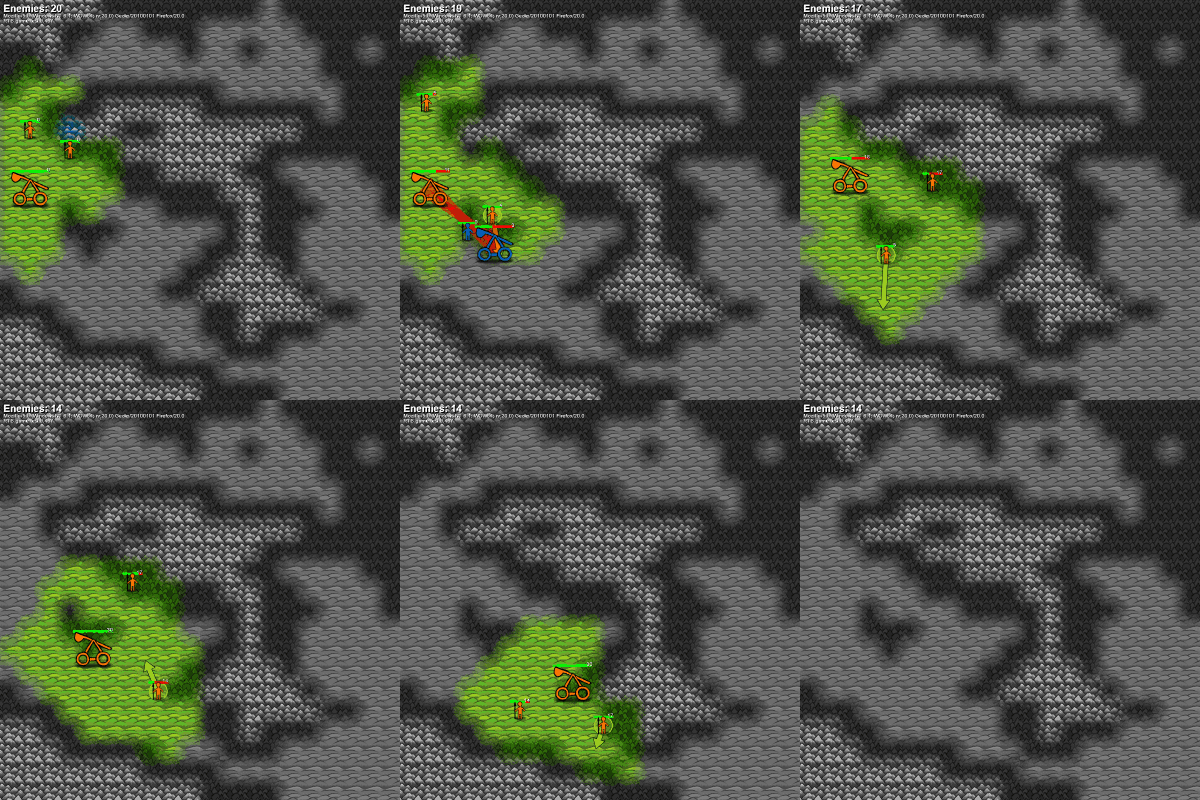
Strategy game experiment

This is a strategy game experiment. A goal is multiplatform, so that it can be played on phones and (even more appropriate) on tablets. Again the textures are made with the web paint app WePaint.

►Start

Update 4.4.2013: Gameplay is added, it consists of following points:
  • Its is basically real time strategy (RTS), all units can move at the same time.
  • A goal was very simple gameplay (with mobile devices in mind). To move is the only command for units. They attack automatically, if there is something in range. To stop an attacking unit, it as to be moved out of range.
  • The map consist of 3 different landscape tiles: lowland,forest,mountains. They affect view range, unit velocity and attack/defense. Lowland has best view range, highest unit velocity and worst attack/defense. Mountains has opposite values and forest is inbetween.
  • There are 2 kind of units, melee and ranged (catapult). Melee attack at near range, ranged units attack at far range but not at near range.
  • Units have hitpoints that regenerate over time. If a units lost all hitpoints, it is removed.
  • Each unit also has experience points, which increase during attacks. The more experience a units has, the better it attacks and defends.
  • Game mission is to defeat all the enemies.

Update 12.4.2013: Games can be recorded and replayed as gif. Resulting gif images are quite small, because 6bit palette and incremental draw is applied (using the library omggif.js).